One of the roles I have is to promote and help implement the positive use of artificial intelligence by teachers, to free-up some of their time so they can be working on other exciting things. AI has had a mixed press recently, especially in the education sector, with many schools, colleges, and universities blanket-banning its use.

I think this approach is somewhat burying one’s head in the sand, hoping that AI will either disappear or some governing body (as yet undefined) will step in and set guidelines to be followed (we are still waiting for social media to be governed more than two decades after its introduction…).
I prefer a much more open-minded approach. AI is here to stay so let us take advantage of it. I read a phrase that really stuck with me but I cannot recall its origin: “Outsource your doing, not your thinking.” However, we must not forget our own ethical responsibilities over its use.
In this post I will share some ideas regarding the use of AI in the classroom. I will be using examples from ChatGPT which, at the time of writing, is not as up to date as, say, Bard or Bing, but is probably the most well-known platform at the moment. The examples will include a lesson plan, a worksheet, and a multiple-choice question sheet. I shall further convert the MCQ sheet into a Microsoft Form quiz.
To start, I define some rules by which I must police myself.
Rules of engagement
When using AI, I think we have certain obligations that we should fulfil. These should be seen as a bare minimum set of rules to adhere to. Strengthening them with familiarity of the platforms and the audiences will only make us better at our jobs. Here is my bare-bones list:
- Proofread the AI output before using it to ensure it is accurate. This is essentially us (the teachers) taking pride in our work and ensuring the standard is correct. It should be as accurate as something that we have written ourselves
- Remove stereotypes from the AI output so that it is inclusive. Ultimately, all of these large language models learn from the internet, which contains a lot of bias, so we need to ensure the output has been sanitised
- Inform the pupils that they are taking part in an AI experiment before using any AI-generated material with them. Whilst you may think this is peculiar, AI is still experimental at this stage and the pupils are our guineapigs. There is an ethical obligation to inform people before you carry out experiments on them. (From experience, it has the added bonus that you can entice pupils that are sometimes less engaged by spending a few minutes at the end of the lesson discussing the AI’s success/failure and how to adapt it for next time… getting buy-in from the less motivated pupils for free!)
Some of you may have read through this section thinking it does not matter. It really does. If you simply generate material and use it immediately, you maybe compounding common misconceptions or you maybe distributing material that is inherently offensive. Pupil outcomes should always be at the forefront of what we do in terms of pedagogy.
Getting started
The main block preventing several teachers I have spoken to from engaging with AI is that they do not know where to start. For ChatGPT, you need an account. This can be created for free through its owner’s website openai.com. Before creating an account, check your school’s policy as to whether you are allowed to use your work email address to log in (I must use my personal email address).
Now that you have an account and have logged in, you will be met with something similar to the following:
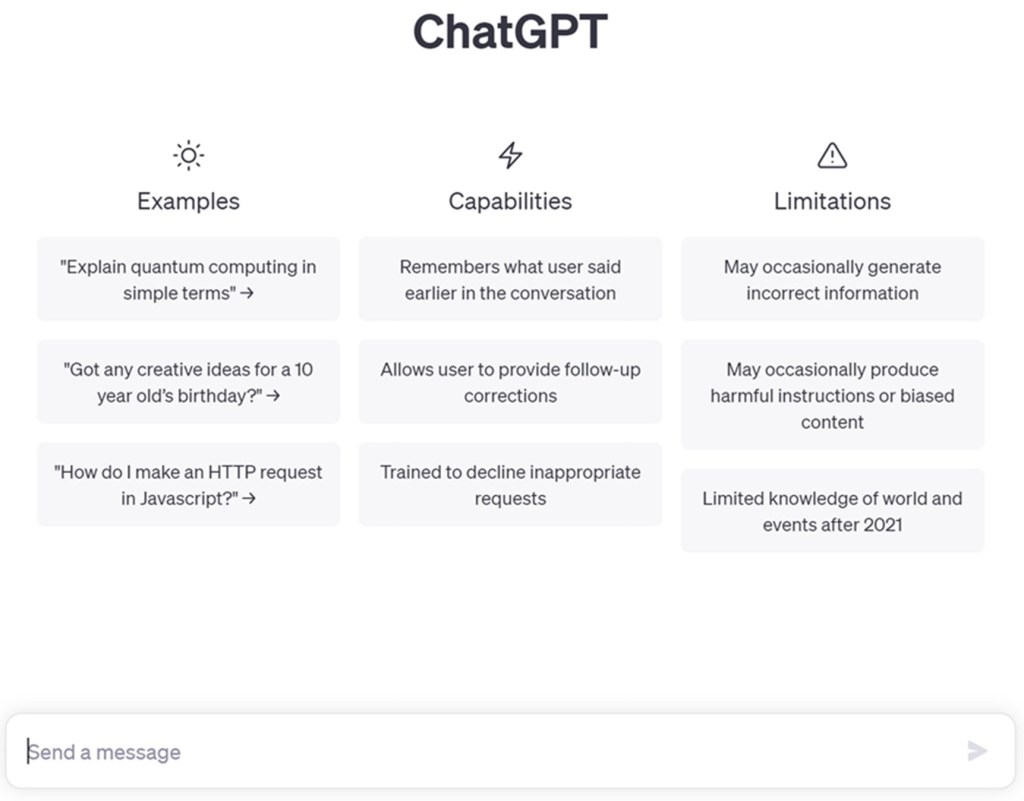
You can instantly start typing in the “Send a message” box and ChatGPT will return results. It is worthwhile playing around a bit at this stage to get a feel for the system.
When I was playing at this stage, I rapidly discovered that I was using the platform as a search engine. This is a pointless exercise because better search engines exist, so I did a bit of research on how to optimise usage. Answer: You need to prep the beast.
Prepping the beast
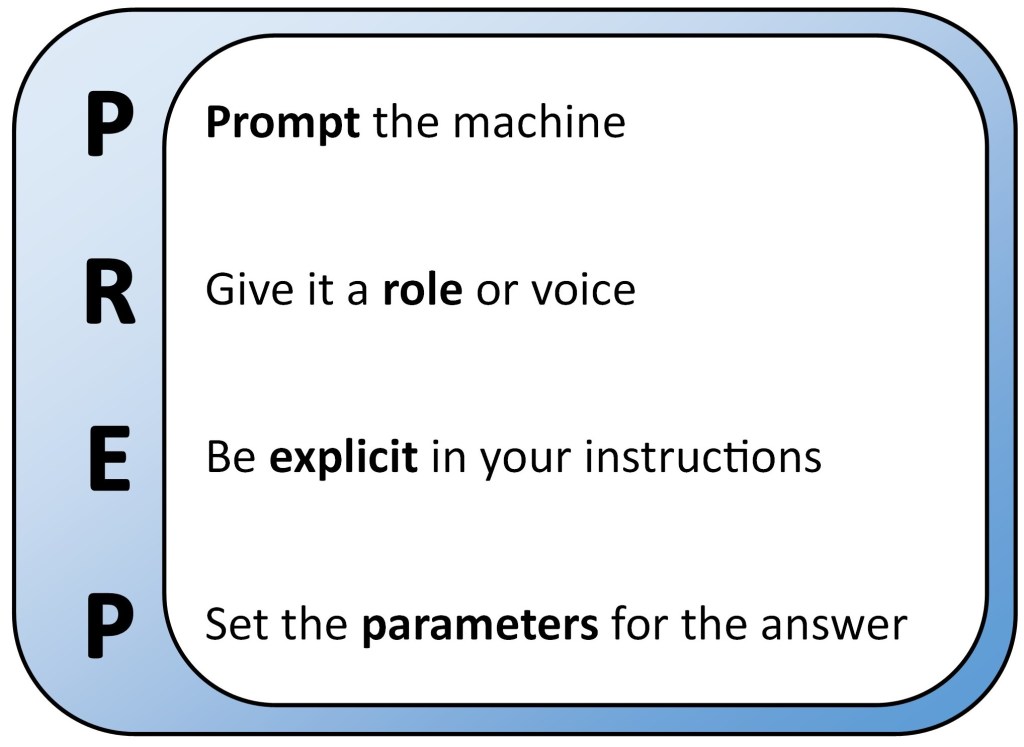
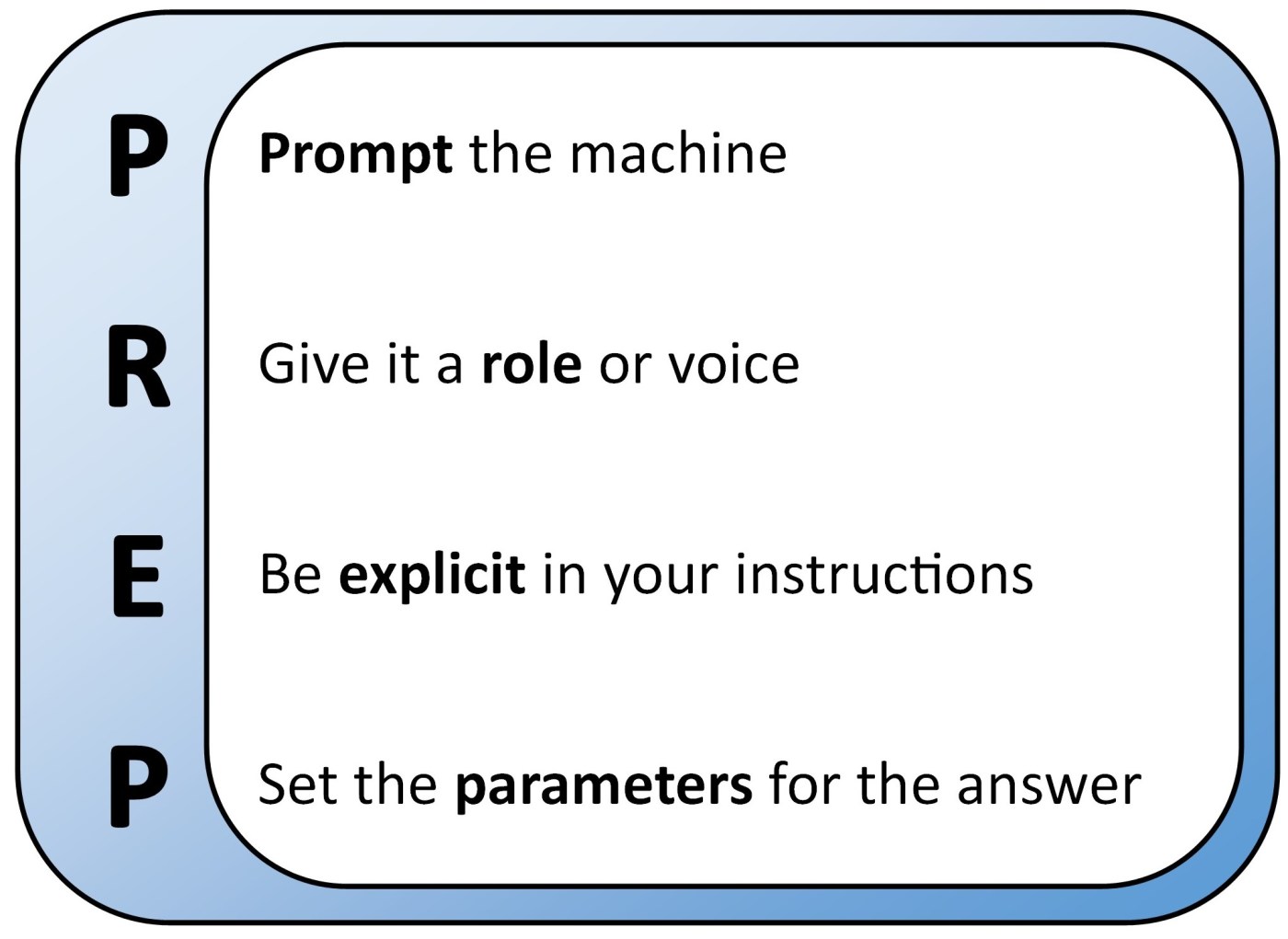
PREP is an acronym for a structured way to address any of the large language models. It helps ensure that you have covered all the bases before asking for a result. The nice thing is that, if, like me, you store all the PREP you have ever written in a Word document, you do not need to rewrite it every time!
Here is a quick guide on how you could use the PREP guidelines to generate a multiple-choice question sheet on Newton’s second law of motion, F = ma:
- Prompt: I want a multiple choice question sheet
- Role: I am a Physics teacher at a UK high school
- Explicit: The sheet should be on Newton’s second law of motion and the equation F = ma and its rearrangements
- Parameters: It should be aimed at year 10 pupils. The sheet should have two questions in total. Each question should have four possible answers. Give only one correct answer per question
With the above, I do not enter the parts in bold into ChatGPT, they are just for the purposes of this post.
Here is ChatGPT’s response:

Remember rule of engagement number 1? We must now inspect the AI output for accuracy. Firstly, has it done what I wanted it to do? Yes, which is not always true – see below. Secondly, the answers it has provided as incorrect decoys are reasonable mistakes that pupils could make (in question 1, A and C are Newton’s other two laws and D is the equation for weight; in question 2, all answers provided are obtainable from the data given if the incorrect mathematical operation is used).
Next, am I happy with the output? I would probably tweak both questions a little bit. In question 1, I would like option B to refer to “resultant force” rather than simply “force” and option D to refer to “weight” rather than “force of gravity.” In question 2, I would like the units to have superscripts properly used (which ChatGPT does not do). Incorporating these changes is a very simple task in a Word document.
Of course, the power of the tool is that I can very easily change my request from two questions to twenty questions. I tried this just now and it took ChatGPT sixteen seconds to finalise its output for a twenty-question multiple choice worksheet. This is much faster than I could ever hope to achieve on my own. Even with editing, I have reduced my burden from maybe twenty-five minutes to perhaps two.
As mentioned above, keep a record of all the PREPs you ever use and, after a few basic ones have been set, you should find yourself only ever making small iterations from then on.
Next, I will create a lesson from scratch using ChatGPT.
Example: Creation of a lesson plan
- Prompt: I want a lesson plan
- Role: I am a Physics teacher at a UK high school
- Explicit: The lesson should be on turning moments
- Parameters: It should last 60 minutes. It is for year 9 pupils. The lesson should start with a 10 minute retrieval practice section and end with a 5 minute plenary
The output from ChatGPT is given here:
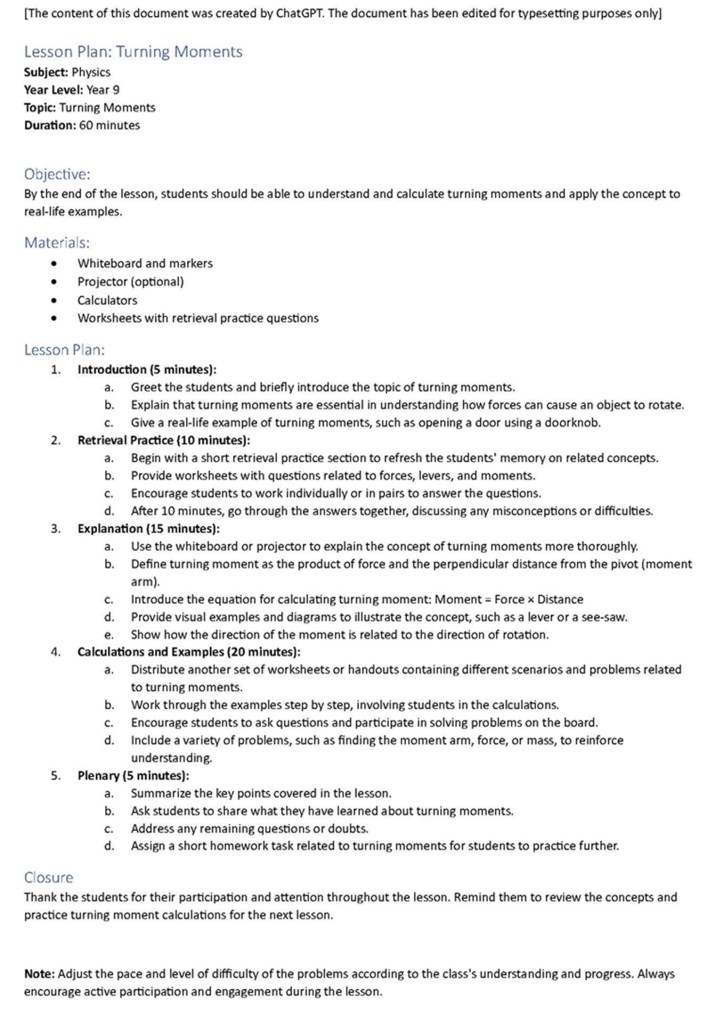
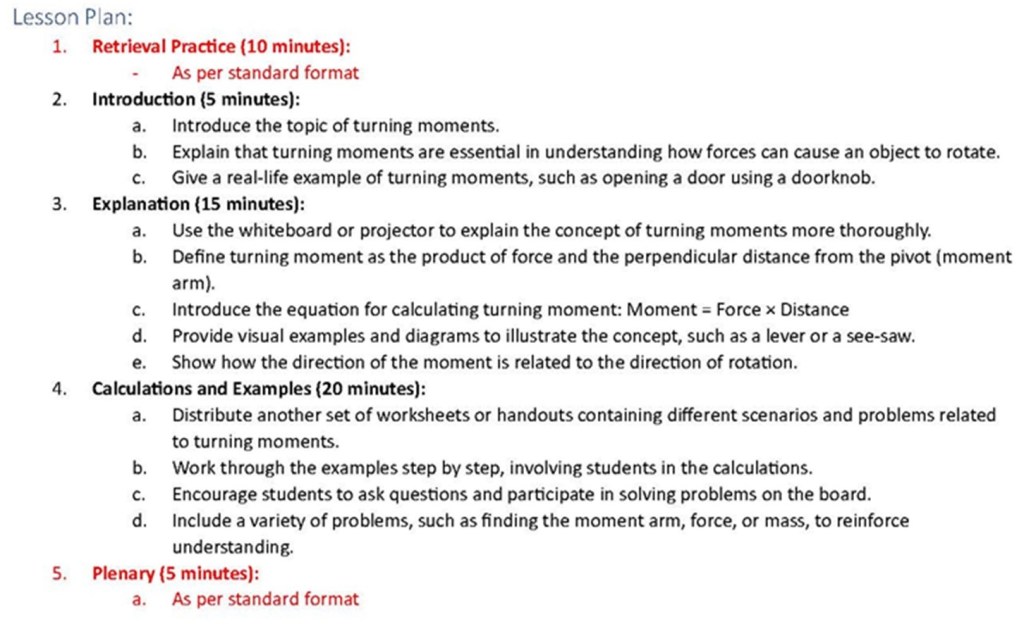
First thoughts: I hope you agree that it appears to be what we may expect a lesson plan to look like. Whilst I would need to add a couple of extra parts to shoe-horn it into my school’s lesson plan template (e.g., EAL or SEN requirements), it is certainly workable.
Is it accurate: I think so.
Would I make changes: Yes.
- Firstly, I would change the order of part 1 (introduction) and part 2 (retrieval practice). This is because my routine is to start every lesson with 10 minutes of retrieval practice; my pupils know to enter the classroom, sit down, and answer those questions. Also, my retrieval practice section has a standard format
- Secondly, ChatGPT has misunderstood what I meant by “retrieval practice.” It has suggested that I explain moments to the class and then spend 10 minutes retrieving that knowledge, whereas I use retrieval practice to test knowledge and understanding from previous lessons
- Thirdly, I have a standard format for plenaries at the end of my lessons
The changes listed above are fairly easy to implement and the entire process of generating the lesson plan from PREP to my first iteration of changes took about three minutes. Here is the thread of the lesson as I would use it, where items in red have been altered from the AI-generated output:
Now that I have a lesson plan, I need worksheets. The following ones are suggested by the lesson plan content:
- Retrieval practice questions (part 1 of lesson plan). I am not going to generate such a list in this post because I have an extensive database of questions built up over years of practice. Hopefully the next two bullet points will show you how easy it is to generate a retrieval practice worksheet for yourselves (maybe I will share my database in the future!)
- A worksheet on moments (part 4 of lesson plan). I shall create this below
- Plenary questions (part 5 of lesson plan). I shall create this below
Example: Creation of a worksheet
- Prompt: I want a worksheet
- Role: I am a Physics teacher at a UK high school
- Explicit: The sheet should be on turning moments, the equation moment = force * distance, and its rearrangements
- Parameters: It is for year 9 pupils. The worksheet should have 11 questions. The first question should be a worked example. The questions should relate to real-life examples. The answer to the first question should be given straight after the first question. All other answers should be given on a separate sheet
When we take a look at the AI-generated content this time, you are going to make a startling revelation. ChatGPT is not a maths or science-engine! Trivial errors (shown in red) have been made which must be corrected by the teacher before distributing the worksheet to the pupils. In this respect, Bard and Bing are much better platforms and we can only hope that future versions of ChatGPT are improved. The purposes of using ChatGPT for this post are because (i) it is probably the best known platform at the moment and (ii) it is actually quite nice that it gets things wrong, because that lets me write about getting things wrong!
Here is the output:
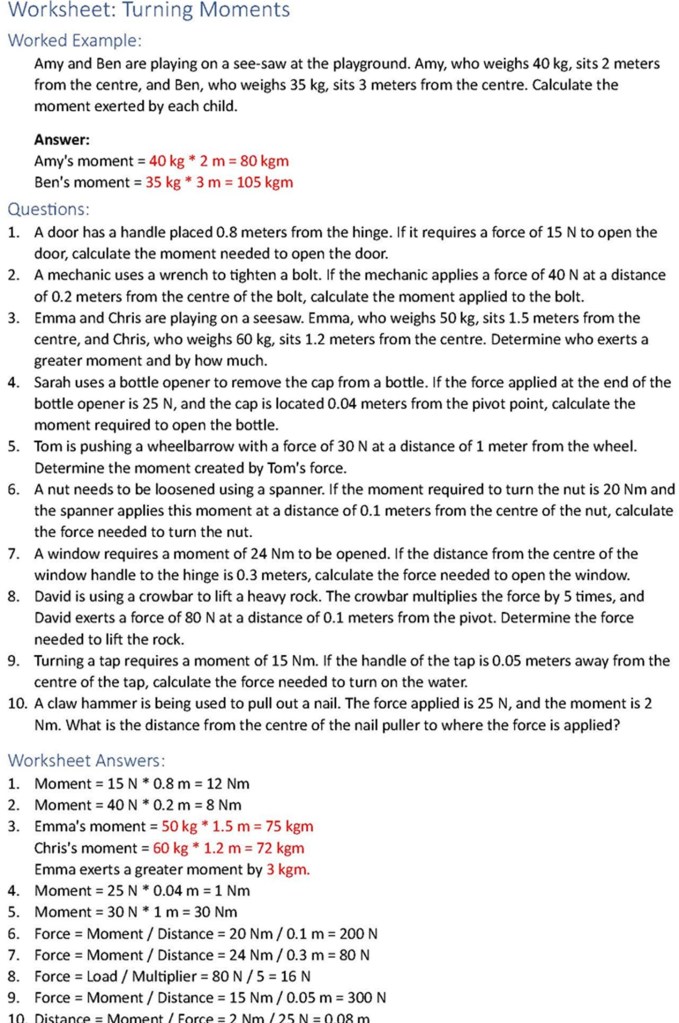
First thoughts: Overall, the worksheet has a lot of usable content. After the teacher has corrected the errors, this could be distributed to the class for use and they should improve their understanding of the equation for moments by completing it. Having said that, the questions are very “samey” which may lead to boredom in a more able class (but it absolutely does suit a less able class). I write this from experience of having asked my pupils for feedback on AI-generated content in the past: It tends to be usable but boring at the top end.
Is it accurate: No. It has made the same mistake on several occasions which is to use mass times distance instead of weight times distance for moment. Weight and mass being interchangeable is a common misconception so the worksheet must be corrected, but, from the teacher’s point of view, it just requires a few things to be multiplied by 10 so it is a very easy correction to make.
Does it embed stereotypes: All names used in the examples are of a similar type. There appears to be a lack of diversity.
Would I make changes: Once the numerical errors have been corrected and I have altered some of the names, I could use it without further changes.
Something I learned fairly early on, when wanting several similar things such as questions for a worksheet, is to ask for more than I want. If I want twenty questions, I will probably ask for twenty-two and delete the worst two. On a similar note, I may ask for seventeen questions, delete the worst two, and supplement the list with five of my own. Hybridisation of AI-generated content with teacher-generated content is really neat because the output is more mixed up and has a more “human” feel to it (plus you could have, e.g., five really directed questions on specific misconceptions embedded within fifteen more generic ones). However, it clearly takes longer to create.
Example: Creation of a multiple-choice quiz for Microsoft Forms
To complete my lesson, I want a multiple-choice quiz as a plenary. However, I do not want a simple hand-out sheet. Instead, being in a fully digital school where pupils use electronic devices, I want the quiz to be in Microsoft Forms to give me instant formative assessment for me to reflect on the lesson’s success. This will use a combination of ChatGPT and Forms. You can only do the Forms conversion if you have a subscription to Microsoft Forms (many schools I visit pay for the full Microsoft suite, so I hope you can proceed).
Content creation with ChatGPT
- Prompt: I want a multiple-choice question sheet
- Role: I am a Physics teacher at a UK high school
- Explicit: The sheet should be on turning moments, the equation moment = force * distance, and its rearrangements
- Parameters: It is for year 9 pupils. The worksheet should have 5 questions. The questions should relate to real-life examples. Each question should have four possible answers. Only one answer can be correct for each question. One question should be word-based for a definition of pivot
Once I had the AI-generated content, I then went through the process of checking the questions for accuracy, lack of stereotypes, etc.
Conversion of content to a Microsoft Form
To convert the AI-generated content into a Microsoft Form, there are some specific processes to follow:
- Cut and paste the questions from ChatGPT to Microsoft Word, retaining only the questions and deleting the header and footer information
- In Word, select all of the content (ctrl-A) and press the “Multilevel list” button in the “Paragraph” menu. This will change the questions insofar as giving the questions question numbers (e.g., 1, 2, 3, …) and giving the answer options nested numbers (e.g., 1a, 1b, 1c, …)
- Save the file
- Navigate in a web browser to Microsoft Forms (note, do not use the version provided by Sharepoint, if your school has such a thing, because we are going to use an option only available in the online version; the online version should accept the same log in information as your Sharepoint version)
- In Forms, select the option “Quick import” (this is not available in the Sharepoint version of Forms)
- Select “Upload from this device” and choose the Word file that you saved earlier
- Select the option “Quiz”
- Select the option “Start review”, proofread all questions, select the correct answers so Forms can grade pupils, and define points if you want to
I have put these instructions, along with images to help guide you, in this Word document.
How did it turn out? You tell me, the Forms quiz I created is here!
When AI goes wrong…
All AI tools can make mistakes. The two most common ones that I struggle with are hallucinating (the AI platform simply generates false information) and maths (whilst the platforms are very good at generating maths-based questions, they are not necessarily that good at answering their own questions. With ChatGPT (the subject of this post), I think it would have a typical success rate of 70%-90% in a given answer sheet).
Of course, the rules of engagement that I gave at the start of this post will scoop up both of these problems and then the material is ready for action. Looking on the bright side, this means that teachers still have jobs because they are needed to validate the AI-generated content!
Summary
In summary, in this post I have created a lesson plan and related worksheets (including one as an online digital Form) using ChatGPT. My role as teacher was to command ChatGPT, check its output for accuracy, and remove stereotypes. Before using the content with a class, I also have the ethical duty of telling my pupils what I am up to.
In total, creation of the lesson plan, worksheet, and Microsoft Form, including proofreading, editing, and correcting, took approximately six minutes. That was from nothing! It may not be the most exciting lesson in the world, but it is a usable lesson and the teacher can jazz it up as required. Furthermore, it would have taken me more like half an hour to do it all by myself. I now have 24 minutes extra in my life to focus on student outcomes, write blogs, drink coffee, etc. If I needed to prepare all of the lessons from scratch for a six-lesson day, I could potentially gain two-and-a-half hours back by using AI!
AI is here to stay. Let us use it to reduce our administrative burden so that we can focus on pupil outcomes.
 Physics Thinking
Leave a comment